A wedding planning workbook
And who is coming, and what needs doing next — in one file you will still trust eleven months from now.
Get the Wedding Planning KitInstant download · $29 once · 30-day refund
Figures from the fictional example file included with the kit. Sample amounts are illustrative, not price guidance.
The problem
Not because you are careless. Because the numbers never live in one place — and the places they do live are not designed to be added up.
Three quotes from the venue, two of them already out of date.
A deposit you paid in March that you can no longer find.
Who said they are coming, buried under two hundred messages.
The balance due next month. And the one after that.
By the time the real number is visible, it is usually too late to do anything about it.
Do the math first
The example file that comes with the kit plans a $36,250 wedding. Put the price of the kit next to it.
You are already spending the large numbers. This is the small one that tells you where they went.
How you use it
Then a few minutes a week for the next year.
Three cells on the first tab. Everything downstream reads from them.
Delete the lines that do not apply to you, add the ones that do, put your own estimates in. The categories and the whole checklist are already written.
The dashboard tells you what is overdue, what is next to pay, and who still has not replied.
See it working
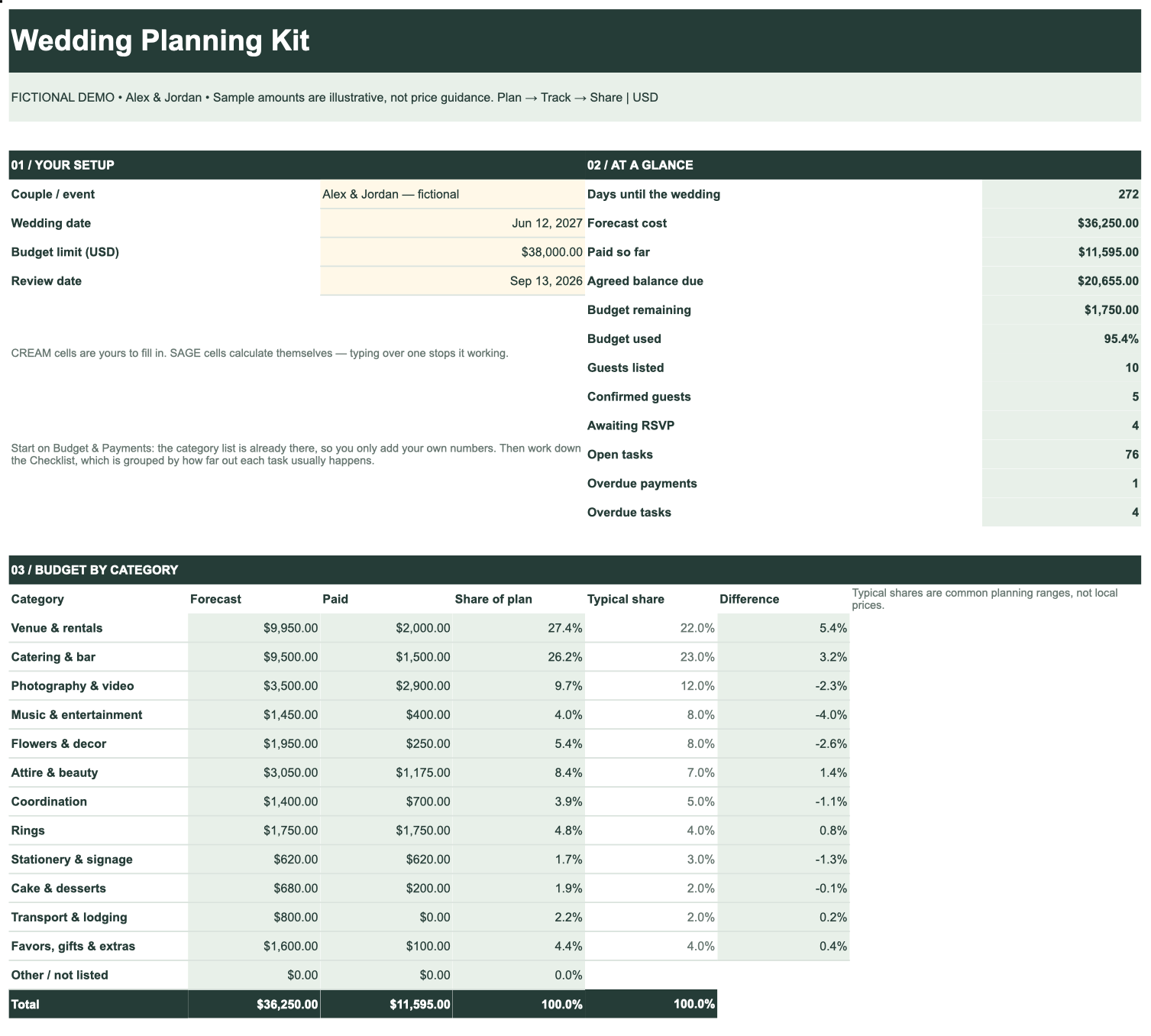
Not an illustration of one. Every figure below was calculated by the workbook from the example data it ships with — the same formulas you get.
↔ Swipe the image to see the whole dashboard.
Screenshot of the included example file. Alex & Jordan are fictional and the amounts are illustrative — the calculations are not.
What you get out of it
The workbook arrives already filled in — every task in the order it usually happens, every budget line already categorized. You adjust what does not apply, and from then on these six answers keep themselves up to date.
Agreed prices plus estimates for everything not yet agreed — so the total is honest, not a best case.
Every deposit and installment with its date, and a flag the moment one slips past.
Confirmed guests counted one person at a time, and a running count of who still has not replied.
Overdue payments and overdue tasks, separately. A task with no date is never falsely called late.
Your share of spend per category against a typical planning share, so you see where you are heavy before it is too late.
An hour-by-hour timeline with the person responsible and the contact for each part of the day.
What you get
One download. No account to create, nothing to install, nothing that expires.
One payment
You are buying a file. It does not renew, it cannot be switched off, and it keeps working after the wedding is over.
Get the Wedding Planning KitOpen it, use it, and if it does not make your planning clearer, write to us within thirty days and we will refund you in full. You do not have to explain why, and you do not have to delete the files.
Questions
It is a standard .xlsx workbook — the ordinary spreadsheet format — with no macros and no external connections. Upload it to Google Sheets and it works straight away, which is how most couples use it. Every formula has also been recalculated and verified by two independent engines before release.
No. One payment, one download, yours permanently. There is no account, no renewal and no way for us to switch it off.
The free tools are good, and they are free because they earn from registry commissions and vendor referrals. That means your details become the product. This is the opposite trade: you pay once, nobody markets to you inside your own planning file, and the data never leaves your computer.
It is built for a laptop, and that is where you will want to do real work. You can open and read it on a phone through the Google Sheets app, but entering a guest list on a small screen is no fun in any spreadsheet. We would rather tell you that now than have you find out after paying.
No. The calculations are written and tested. You type in your own numbers; the totals, balances, overdue flags and category breakdown update themselves. Editable cells and calculated cells are colored differently so it is obvious which is which.
Write to us within thirty days of buying and we refund in full, without asking for a reason. Refunds go back to your original payment method.
Two options